Podcast promotion · Step-by-step guide

How to Make a Podcast Trailer (Step-by-Step)

A podcast trailer gives new listeners a quick reason to press play. To make one, choose the show’s clearest promise, select a memorable moment or two, and shape them into a concise story with a direct invitation to listen. This guide walks through the process from planning and scripting to reviewing a finished trailer and adapting it for social video. It also includes example source videos for inspiration and explains how an AI video workflow can help turn a prompt or reference material into a visual version of your idea.

A look at the visual-generation experience that can support short-form storytelling.

What Is a Podcast Trailer? (Quick Definition)

A podcast trailer is a short preview that introduces a show, its subject, and the reason someone might want to listen. It can combine a host introduction, a strong excerpt, music or other sound, and a clear call to action. A trailer helps listeners quickly understand the show before they commit to a full episode, and a video version can also introduce it on social platforms.

Podcast Trailer Examples and Source Videos

These examples are source material for studying themes, tone, and audience appeal; they are not presented as finished podcast trailers. Notice how a focused idea or human story can give a short promotional piece a clear center.

Gen Z and the Rise of the Creator Economy

This 171-second source discusses creator platforms, niche communities, authenticity, monetization, and creator challenges. For a trailer, identify one audience-relevant tension or question rather than trying to summarize every theme.

Building Creative Community Through Authenticity

This 226-second example follows creators using livestreaming, collaboration, and community engagement. Its people-first subject can help you think about which voice, relationship, or moment best represents a show.

Airborne A Symposium: by Margaret Atwood

This 79-second story centers on women sharing reflections about literary careers, friendship, and rivalry. When planning a trailer for a conversational show, look for a concise exchange that signals both the topic and the character of the conversation.

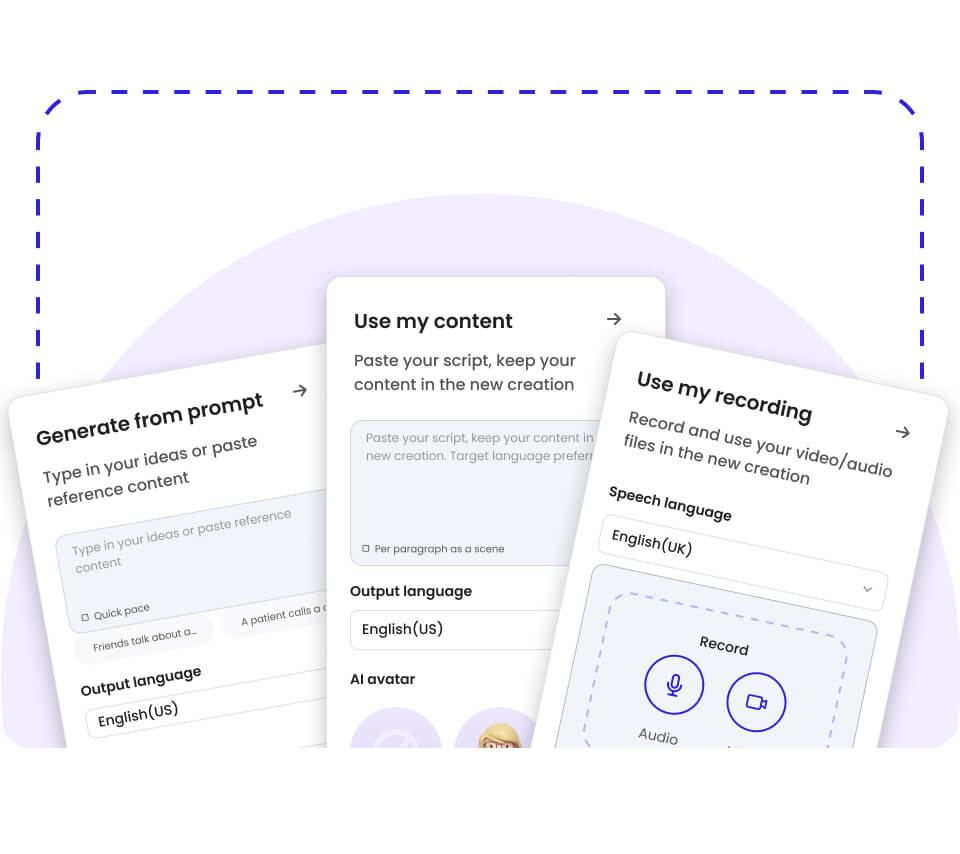
Illustration of prompt, existing content, and recording as different starting points for video creation

Start from a prompt, recording, or existing content

A trailer concept can begin as a written prompt or reference material. For visual planning, podcast trailer scripting helps clarify what the listener should understand before you shape a video around it.

Quick Answer (Do This First)

If you are short on time, make the trailer about one clear promise and one compelling reason to hear more.

  • Write one sentence explaining who the podcast is for and what it explores.
  • Choose one memorable excerpt, question, or story that supports that promise.
  • Draft a simple sequence: hook, show introduction, preview, and invitation to listen.
  • Keep only lines that add information, emotion, or context.
  • Use clear speech and sound that does not compete with the host’s words.
  • End with the show name and a direct next step for the listener.
  • For a social video, decide whether a fast prompt-led workflow or a more controlled storyboard suits the project.

Prerequisites (What You Need)

Gather the essentials before editing so the trailer stays focused and the final review is straightforward.

  • A clear description of the podcast and its intended audience
  • A recorded excerpt or a written script for the trailer
  • The podcast name and the listener action you want to prompt
  • Music or sound elements you have permission to use, if needed
  • For an AI-generated video, a prompt and any relevant image, video, or audio references
  • A destination or publishing plan for the finished trailer

Step-by-Step: Make a Podcast Trailer

Use these steps to move from the show’s central idea to a concise, reviewable trailer.

  1. Step 1: Define the trailer’s promise

    What to do: Write one plain-language sentence describing the podcast’s subject, intended audience, and point of difference. Treat this as a filter for every line and clip you consider.

    Success looks like: Someone unfamiliar with the show can tell what it is about after reading the sentence.

    Common mistake to avoid: Trying to include the full history of the show instead of communicating its central appeal.

  2. Step 2: Choose a hook and supporting moment

    What to do: Select a vivid question, statement, or short excerpt that makes the subject immediately interesting. Add a second moment only if it gives listeners useful context or a different sense of the show.

    Success looks like: The opening earns attention and the next moment reinforces the promise, rather than introducing an unrelated idea.

    Common mistake to avoid: Choosing a clip just because it is entertaining when it does not represent the podcast.

  3. Step 3: Write a concise trailer script

    What to do: Arrange the hook, a brief host or show introduction, one preview moment, and a closing invitation. Read the draft aloud and remove repeated information or lines that do not help a new listener understand the show.

    Success looks like: The script sounds natural when spoken and gives the listener a clear next step.

    Common mistake to avoid: Writing dense promotional copy that sounds unlike the podcast itself.

  4. Step 4: Assemble and balance the audio

    What to do: Place the selected speech in the planned order, then add only the sound elements that support the mood and pacing. Listen through once for clarity and once more for transitions, pauses, and distracting background sound.

    Success looks like: Every spoken line is understandable and the sound supports rather than obscures the message.

    Common mistake to avoid: Letting music or effects overpower dialogue or make the sequence feel crowded.

  5. Step 5: Plan a visual version if you need one

    What to do: Match visual choices to the show’s subject and audience. For a quick social concept, test a short prompt-to-video approach; when you need more control over the sequence, plan the shots in a storyboard first. Prompt-to-video creation can be a starting point for a short-form visual, while Mootion Instant Mode generates videos up to 30 seconds.

    Success looks like: The visuals reinforce the subject and do not distract from the trailer’s main idea.

    Common mistake to avoid: Adding visuals that suggest a different topic or tone from the podcast.

  6. Step 6: Review, revise, and prepare the release

    What to do: Check the name, spoken information, ending, and intended destination. If you are producing a video, review the visuals alongside the audio and confirm that the final file suits the platform where you plan to share it.

    Success looks like: The trailer introduces the show accurately, has a clear ending, and is ready for its intended use.

    Common mistake to avoid: Exporting or sharing before checking the full trailer from beginning to end.

Validation Checklist (Make Sure It Worked)

Use this final pass to catch unclear messaging or production issues before sharing your trailer.

  • ☐ The show name is easy to hear or read.
  • ☐ A new listener can identify the podcast’s subject.
  • ☐ The opening gives a clear reason to keep listening.
  • ☐ Each excerpt supports the central promise of the show.
  • ☐ Speech remains clear throughout the trailer.
  • ☐ Music and effects do not compete with dialogue.
  • ☐ The ending tells the listener what to do next.
  • ☐ The visuals, if included, fit the podcast’s topic and tone.
  • ☐ The finished version has been reviewed from start to finish.

Common Issues & Fixes

Problem Cause Fix
The trailer feels unfocused It introduces too many topics or ideas. Return to the one-sentence promise and remove sections that do not support it.
The opening takes too long Background and context arrive before the hook. Move the most compelling relevant line to the beginning, then add only the context listeners need.
Speech is hard to follow Music, effects, or background sound compete with the voice. Reduce competing elements and listen again on the device or setup you will use for review.
The ending feels abrupt The trailer stops without naming the show or guiding the listener. Add a short close with the show name and a specific invitation to listen.
The video does not match the audio Visuals were chosen without reference to the trailer’s core idea. Revisit the script and choose imagery that reflects its subject, mood, and key moments.

Best Practices (Do It Right Long-Term)

  • Keep one central promise — a focused trailer is easier for a new listener to understand.
  • Use real, representative moments — the preview should set an accurate expectation for the show.
  • Read the script out loud before recording — spoken language often needs shorter, simpler phrasing.
  • Leave room for pauses and transitions — breathing space can make a short piece easier to follow.
  • Use music and effects selectively — restraint helps preserve speech clarity.
  • Adapt the visual plan to the platform and story — a deliberate format keeps the trailer coherent where it appears.
  • Review the final version as a first-time listener — this makes unclear references and missing context easier to spot.

Recommended Tool (Optional): Mootion

Mootion is an AI visual storytelling platform for turning prompts and reference materials into videos. For a podcast trailer, it can support the visual-production portion of the workflow; you can still plan the audio message and review the result against your own creative goals.

  • Use Instant Mode for prompt-to-video generation of short-form videos up to 30 seconds.
  • Use Director Mode when you want to build a storyboard before rendering and guide shots with character or scene references.
  • Smart Reference accepts images, videos, and audio as inputs for a multimodal starting point.
  • Automatic prompt optimization can help refine the prompt used to begin a visual concept.
  • Director Mode supports workflows with durations from 30 seconds to 10 minutes.

To connect a show idea with a visual sequence, explore storyboard-led video creation and audio and visual references. Mootion does not have a free plan, so check the current plan details before starting.

Use it when you want AI-generated visuals or a storyboard-based video workflow; do not use it as a substitute for deciding what your podcast trailer should say.

View plan details
Video-generation interface with a prompt field and a visual scene preview

For social distribution, consider how the visual and audio experience work together, then prepare the version that suits the intended destination. Mootion also supports exporting assets for further editing; see how video exports for podcast promotion fit into your production plan.

FAQs

What is a podcast trailer?+

A podcast trailer is a short preview that introduces a show to potential listeners. It usually gives people a sense of the subject, voice, or style and invites them to listen. It can be produced as audio, video, or a combination, depending on where you plan to share it.

What should I include in a podcast trailer?+

Start with a strong, relevant hook, then give a brief introduction to the show. Include a memorable excerpt or preview that represents the podcast, rather than trying to cover every episode topic. Close by naming the show and telling listeners what to do next.

How do I make a podcast trailer video from an idea?+

First write a short description of the show and decide which moment or message the video should communicate. Then make a simple visual plan that follows the audio’s meaning and tone. A prompt-to-video workflow can help explore a visual concept, while a storyboard-based workflow gives you more control over the planned sequence.

Can Mootion use audio or other references for a podcast trailer video?+

Mootion’s Smart Reference accepts images, videos, and audio as inputs. You can also use a text prompt to begin a video-generation workflow. The best starting point depends on the material you have and how much control you want over the scene sequence.

How long can a podcast trailer video be in Mootion?+

Mootion Instant Mode generates videos up to 30 seconds. A separate Director Mode workflow supports durations from 30 seconds to 10 minutes. Choose a workflow and duration based on the intended video and the plan details available when you create it.

Is there a free Mootion plan for making a podcast trailer?+

Mootion does not offer a free plan. Paid plans use credits and have different limits and features, so check the current pricing page before choosing a plan. Review the available terms against the amount and type of video work you expect to create.

Make a Trailer That Gives Listeners a Reason to Press Play

A compelling podcast trailer starts with a clear promise, uses a small number of representative moments, and ends with a direct invitation. Take time to listen for clarity and remove anything that distracts from the show’s central idea. If you want to create a visual companion, choose a prompt-led or storyboard-led workflow that fits your production needs, then review the result alongside the audio before sharing it.

Run