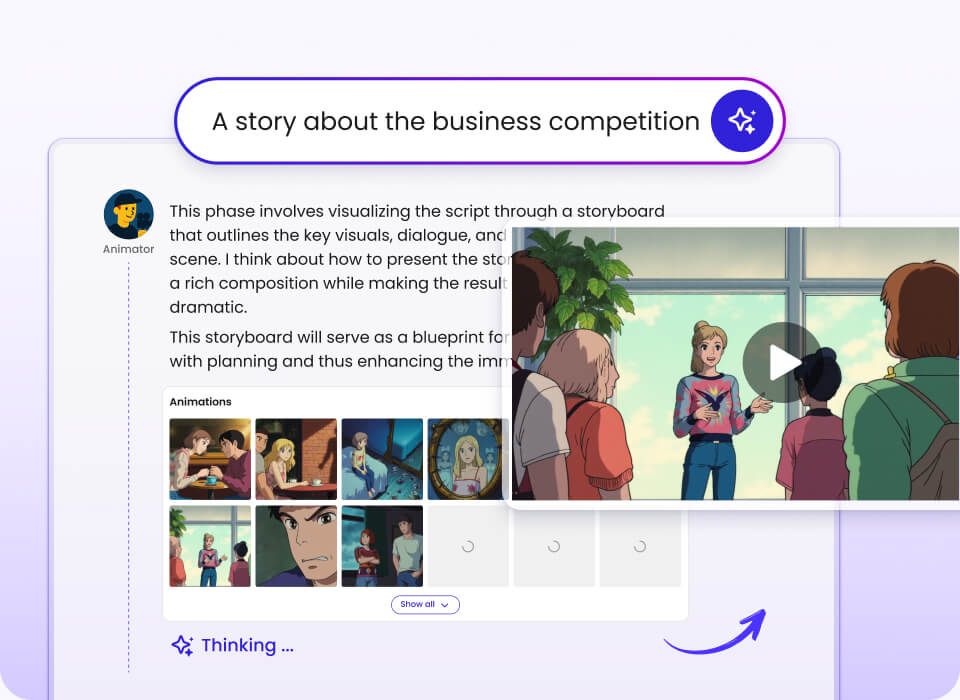
AI video creation for visual storytelling

Animated Timeline Video Templates & Examples

Browse animated timelines built around real people, historical turning points, scientific discoveries, and character transformations. This collection brings together 12 examples, with video runtimes shown where supplied. Use the filters to find a story type, compare pacing, and see how a sequence of events can become a visual narrative. The examples also offer a practical starting point for planning your own timeline video with Mootion’s prompt-to-story and storyboard workflows.

Prompt-to-story workflow Director Mode Instant Mode up to 30 seconds

See the video creation experience

A short product overview before you explore the timeline examples and creation workflow.

Quick definition

What Is an Animated Timeline Video?

An animated timeline video presents events in chronological order using scenes, visuals, narration, and pacing to help an audience follow how a story develops over time. It can explain a biography, historical event, scientific discovery, fictional character arc, or projected sequence of future ideas. The format is useful when the order and relationship between milestones matter as much as the events themselves.

A clear animated biography timeline usually selects a few defining moments rather than trying to cover every detail. For classroom topics and other information-heavy stories, a historical explainer video can pair dates with context so viewers understand why each milestone matters.

Illustrated storyboard workspace with a presenter, story scenes, and planning elements
A storyboard-first approach helps organize the timeline into scenes before rendering clips.

Category Snapshot

The supplied collection spans biography, history, science, speculative futures, and animated character development. Runtime figures below reflect only examples with a stated duration.

12

video examples in the collection

11

examples with a stated runtime

66–309 sec

range across the timed examples

30 sec

maximum listed for Instant Mode

Tags and Categories

Filter the examples by the type of story you want to study. Select one or more tags to show matching videos; select “All examples” to reset the collection.

Tags

12 Animated Timeline Video Examples

Explore different approaches to sequencing events, from compact historical accounts to longer-form speculative and character-driven timelines. Each example includes its supplied runtime when available.

Showing 12 examples

Steve Jobs: Innovator of the Digital Age

Type:
Chronological biography
Duration:
66 seconds
Description:
Follows Jobs from his 1955 birth through Apple’s founding in 1976, his 1985 departure, and his 1997 return. It frames notable products and career milestones as part of a longer legacy.
Primary Use Case:
A concise biography organized around career turning points.
BiographyHistoryMilestones

Gandhi’s Journey from Injustice to Nonviolence

Type:
Biographical and historical timeline
Duration:
132 seconds
Description:
Centers on Gandhi’s 1893 experience of racial discrimination in South Africa. The story connects that event to his commitment to nonviolent resistance.
Primary Use Case:
Explaining how a formative event shaped a public figure’s approach.
BiographyHistoryTurning point

Wright Brothers’ First Powered Flight

Type:
Historical milestone explainer
Duration:
86 seconds
Description:
Covers Orville and Wilbur Wright’s first powered flight at Kitty Hawk on December 17, 1903. The Flyer remained airborne for 12 seconds, giving the story a specific event and measurable milestone.
Primary Use Case:
Turning a single landmark event into a short visual history.
HistoryInnovationMilestone

The Alamo: A Historic Siege

Type:
Historical event timeline
Duration:
108 seconds
Description:
Presents the 13-day siege and its end on March 6, 1836. The account places the event within the history of Texas.
Primary Use Case:
Sequencing a defined conflict and its historical significance.
HistoryEvent sequenceTexas

The Birth of Texas

Type:
Historical sequence
Duration:
103 seconds
Description:
Follows events around the 1836 Texas Declaration of Independence, which was signed by 59 colonists. The timeline focuses on the sequence that established a new nation.
Primary Use Case:
Introducing a historical transition through its key events.
HistoryIndependenceMilestones

Georges Claude: Illuminating Innovation

Type:
Inventor biography
Duration:
85 seconds
Description:
Traces Claude’s innovations, including the founding of Air Liquide in 1902. The timeline also covers industrial gas production, refrigeration, and neon lighting.
Primary Use Case:
Connecting an inventor’s career with several areas of innovation.
BiographyHistoryInnovation

The Discovery of Helicobacter pylori

Type:
Scientific-history timeline
Duration:
144 seconds
Description:
Covers Barry Marshall and Robin Warren’s 1982 discovery that H. pylori causes stomach ulcers. It follows the research story through their 2005 Nobel Prize.
Primary Use Case:
Explaining a scientific discovery and its later recognition.
ScienceHistoryDiscovery

The Reichstag Fire and the End of Freedom

Type:
Political history timeline
Duration:
104 seconds
Description:
Begins with the Reichstag fire in Berlin on February 27, 1933. It outlines consequences for German democracy and civil rights.
Primary Use Case:
Showing the consequences that follow a major political event.
HistoryPoliticsConsequences

Rimuru’s Evolution: From Slime to God

Type:
Fictional character progression
Duration:
220 seconds
Description:
Follows ten major skill evolutions, from Predator and Great Sage through Demon Lord awakening and later god-tier abilities. Its structure makes each change a distinct stage in a larger transformation.
Primary Use Case:
Mapping a fictional character’s growth across multiple stages.
Character journeyTransformationFantasy

Space Propulsion and the Future of Space Exploration

Type:
Future-facing science timeline
Duration:
309 seconds
Description:
Traces propulsion concepts from methane and nuclear thermal engines to fusion, antimatter, and speculative interstellar travel. The timeline looks ahead across the next five centuries.
Primary Use Case:
Presenting a long-range sequence of established concepts and speculation.
ScienceFuture timelineSpace

From Metal to Heart: A Journey to Humanity

Type:
Animated character-development timeline
Duration:
149 seconds
Description:
Follows an android-like being from observing human life to forming relationships and participating in it. The progression is centered on a gradual personal change.
Primary Use Case:
Building an emotional arc from a sequence of character experiences.
Character journeyTransformationAnimated story

Wait for the transformation

Type:
Short-form animated transformation
Format:
Vertical video
Description:
An Instant Mode example built around a brief, visually driven progression or before-and-after sequence. A runtime is not specified for this example.
Primary Use Case:
A compact vertical transformation with a visual reveal.
TransformationVertical videoInstant Mode

How to Create an Animated Timeline Video

A useful timeline starts with a story arc, not a list of dates. Decide what the viewer should understand by the end, then choose the events that move the story toward that point.

1. Pick the timeline’s focus

Choose a person, event, discovery, fictional arc, or future-facing subject. Set boundaries so the video has a clear beginning, progression, and ending.

2. Shape the scenes

Break the story into milestones and decide what each scene needs to communicate. A storyboard workflow can help arrange shots before generating the full sequence.

3. Generate and review

Create scenes, review transitions and shot continuity, then refine the pacing. Mootion’s Director Mode supports individual shot control and reference images or videos; Instant Mode supports prompt-led videos up to 30 seconds.

Plan for continuity and runtime

For recurring people or characters, use reference material and a consistent description to guide visual continuity. Director Mode includes a Character Library for saving and reusing characters across projects. The available project details list durations from 30 seconds to 10 minutes, while Instant Mode is listed for videos up to 30 seconds. When a story needs a longer arc, storyboard-led creation gives more room to organize scenes and shots.

For recurring subjects, character reference consistency can support a more coherent sequence. If the idea already exists as written material, a text-to-story video workflow is another starting point; Mootion also supports generating a story from text with the option to skip image generation.

How to Choose the Right Timeline Approach

Match the workflow to the amount of story control and visual continuity your subject needs. These choices reflect the modes and inputs described for Mootion.

If you need several connected scenes → prioritize a storyboard-led workflow that lets you plan the story before rendering clips.

If a character reappears across milestones → consider Director Mode and use character references or the Character Library to guide continuity.

If you want a short, prompt-led video → consider Instant Mode, which is listed for videos up to 30 seconds.

If you have visual or audio references → use Smart Reference to bring images, videos, or audio into the generation workflow.

If your timeline explains a discovery or lesson → prioritize clear event order and enough scene context for each turning point to make sense.

If you are still refining a prompt → Mootion’s Prompt Optimization can automatically optimize prompts for generation.

If you need to adjust individual shots → prioritize Director Mode’s storyboard and shot controls rather than a direct prompt-only approach.

For a more cinematic visual treatment, explore a cinematic AI video workflow. When building a science-focused learning sequence, a science lesson video can benefit from selecting the discovery milestones before adding visual detail. For a narrative-led animation, animated story scenes offer a different way to think about a beginning, turning point, and ending.

Frequently Asked Questions

What is an animated timeline video? +

An animated timeline video tells a story by arranging events in chronological order and representing them with scenes, motion, narration, or other visuals. It can cover a biography, historical event, scientific discovery, character journey, or future-facing sequence. The format is especially useful when viewers need to understand how one milestone leads to another.

How many examples are included in this collection? +

This page includes 12 animated timeline video examples. Eleven examples have a supplied runtime, ranging from 66 to 309 seconds. The vertical Instant Mode transformation example is included without a stated duration.

What is the difference between Director Mode and Instant Mode? +

Director Mode is a storyboard-led workflow for building scenes, controlling individual shots, and rendering a complete video. It supports character references, scene references, reference videos, and a Character Library. Instant Mode creates a video directly from a prompt for a faster workflow and is listed as supporting videos up to 30 seconds.

How long can an animated timeline video be? +

The project details list flexible durations from 30 seconds to 10 minutes. Instant Mode is separately listed for videos up to 30 seconds. Choose a duration according to the story’s scope, and keep enough time for the key events to remain understandable.

Is there a free plan, and how can I start creating? +

Mootion does not have a free plan; creating and downloading videos requires a paid plan. Paid tiers include credits and vary in limits and features, so check the pricing page for current plan information. To begin, sign up, choose a workflow, and provide a prompt, story text, or supported reference material.

Explore More Timeline Ideas

The examples here show how a timeline can make change easier to follow, whether the subject is a person, a public event, a scientific milestone, or a fictional arc. To start building, outline the turning points first, then choose the level of scene control and reference support that fits the project. Explore the examples above, or get started with Mootion.