AI video creation for complete visual stories

AI Storytelling Video Generator for Creators Without Manual Scene Building

Turn a prompt, script, image, audio file, or video reference into a connected story with consistent characters, cinematic visuals, emotional performances, and controlled shots.

AI storytelling video generation interface with prompt and cinematic video controls

See how a single vision can become a complete cinematic video.

What Is an AI Storytelling Video Generator?

An AI storytelling video generator transforms ideas, prompts, scripts, and multimodal references into structured video stories. It can connect characters, environments, action, dialogue, lighting, and pacing rather than producing only isolated clips. Mootion is designed for creators, educators, filmmakers, animators, marketers, and storytellers who want to move from concept to cinematic video with less manual scene building. For creators exploring a broader cinematic AI video workflow, it also provides Instant Mode and Director Mode for different levels of control.

Create Stories With Connected Characters and Scenes

Choose a fast prompt-to-video workflow or build a more controlled production with references, storyboards, characters, and clips.

Director Mode character list showing consistent character controls

Director Mode for detailed control

Build an end-to-end story from text while defining characters, scenes, storyboards, shots, and final composition. Upload character images, scene references, and reference videos to guide motion and improve consistency across scenes. It is suited to creators who need a more deliberate AI story production workflow.
Director Mode video generation controls and duration menu

Instant Mode for fast short-form stories

Go directly from one prompt to a short video with automatic prompt optimization. Instant Mode supports videos up to 30 seconds and is designed for TikTok, YouTube Shorts, and Instagram Reels, with Seedance 2.5 and MiniMax H3 available in the workflow.

Director Mode reference image and reference video controls

Smart Reference for multimodal direction

Guide generation with images, videos, audio, or multiple reference types in one project. This gives your story a clearer visual starting point and helps translate a concept into scenes with more intentional direction.

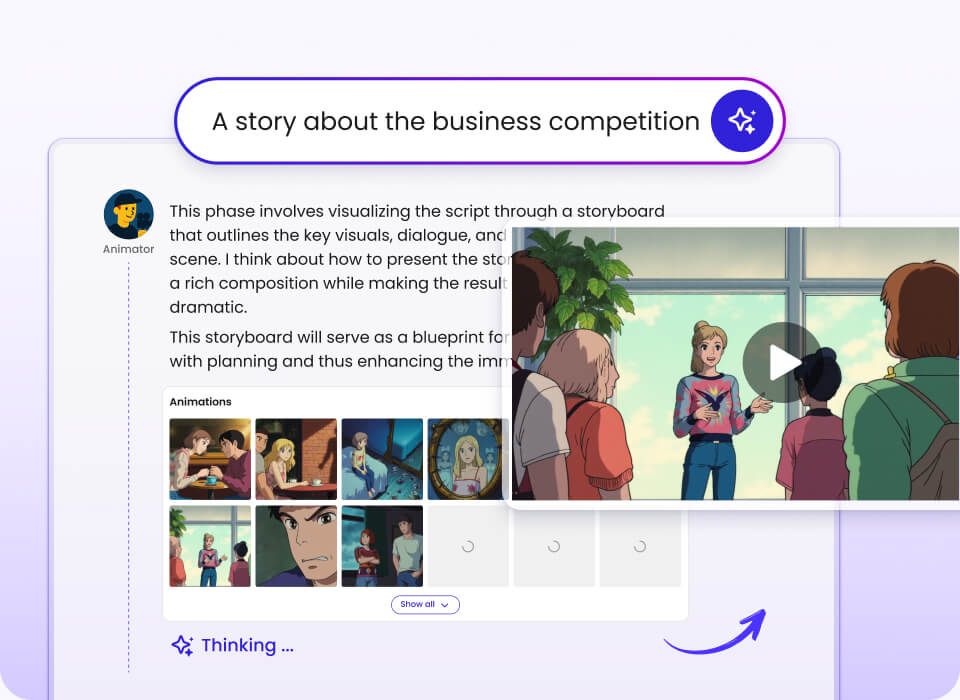
Illustrated storyboard workspace with generated scenes and characters

Stories across genres and formats

Create cinematic shorts, fantasy, animation, education, science fiction, marketing stories, motivational narratives, and more. Explore a cinematic story video approach when your idea needs characters, atmosphere, and progression rather than a single visual.

What You Get

Generate complete scenes from a single prompt with connected environments, action, characters, and performances.

Preserve character identity across scenes with consistent expressions, appearances, and performance direction.

Shape emotional moments with expressive looks, dialogue, atmosphere, and film-inspired lighting.

Control production depth by choosing quick Instant Mode or detailed Director Mode.

Create flexible durations ranging from 30 seconds to 10 minutes, depending on the selected workflow.

Reach multilingual audiences with expanded output language support, including Greek and Kazakh.

How It Works

Step 1

Describe the story

Enter a prompt or bring images, video, audio, scripts, and other references into the project.

You see your idea organized as a starting point.

Step 2

Direct characters and scenes

Choose Instant Mode for speed or Director Mode to define characters, references, shots, and scenes.

You see story structure and visual direction take shape.

Step 3

Generate and compose

Generate reference images and clips, then bring the selected shots together into the final story.

You see a connected video ready for review and use.

Features

Core workflow features

  • One-prompt complete scene generation
  • Instant Mode prompt-to-video creation
  • Director Mode for controlled story production
  • Character lists, scenes, storyboards, and shots
  • Text-to-story workflow without manually generating images first

Reliability & control

  • Consistent character identity across scenes
  • Custom character reference images
  • Scene reference images and motion videos
  • Generate all reference images or all video clips
  • Seedance 2.5, Seedance 2.0, and MiniMax H3 models

Integrations & export

  • Smart Reference support for images, videos, and audio
  • Short-form output for TikTok, YouTube Shorts, and Instagram Reels
  • Videos from 30 seconds to 10 minutes
  • Downloadable videos and story assets
  • Scripts, images, and clips available for third-party editing

Proof: Stories Created With Mootion

  • 100,000,000+ videos created according to the provided company information.
  • 5,000,000+ creators have used the platform.
  • 50+ countries are covered by the platform.
  • The platform supports 10+ languages on its homepage and a documented 17-language output list.

“With Mootion, I can turn my ideas into a storyboard with great cinematic images as I expected.”

@XVisualneuFX, Audio & video editor

Featured AI Storytelling Videos

Watch examples spanning workplace drama, science fiction, anime, animation, product promotion, and transformation stories.

Would You Sign the Badge?

A cinematic workplace story made with one prompt, zero cuts, and full cinematic control.

Aliens Arrival

A science-fiction story featuring cinematic lighting and detailed character micro-expressions.

AI Anime Story Collection

Fantasy, action, romance, and science-fiction scenes shaped around creator imagination.

Cleaning Robot

A 3D animation exploring how a cleaning robot responds to being treated gently or roughly.

Director Mode Demo

See how custom characters, scene references, reference videos, controlled shots, and text-led story creation work together.

For fast short-form production, explore a 30-second AI video workflow. For longer projects, the platform also supports story examples with durations up to several minutes.

Comparison: Why This Workflow vs Alternatives

Decision factor Mootion Manual video workflow Basic prompt video tool
Starting pointPrompt, script, image, audio, or videoManually gathered assetsPrimarily a prompt
Connected story workflowInstant Mode and Director ModeBuilt manuallyNot specified in the provided information
Character referencesCustom images and character listsManaged manuallyNot specified in the provided information
Control levelScenes, shots, clips, and compositionHigh, but manualPrompt-led
Output duration30 seconds to 10 minutesDepends on productionInstant Mode up to 30 seconds

The comparison describes workflow differences supported by the supplied product information; capabilities of generic alternatives can vary.

Credentials & Key Stats

100M+
videos created
5M+
creators
50+
countries covered
17
documented output languages

“It was exactly what I was looking for to make my lessons more interactive and engaging!”— Saadia, English teacher

“Your platform gave my video a boost!”— Gina, Indie content creator

“Easy to use, got the video in just a few clicks.”— @seirdotmk, AI content creator

FAQs

Who should use an AI storytelling video generator?+

It is designed for creators, educators, filmmakers, animators, marketers, and storytellers. It is useful when a project needs connected scenes rather than isolated generated clips. Instant Mode is suited to fast short-form story creation. Director Mode is suited to users who want more control over characters, scenes, references, shots, and composition. The best starting point depends on how much direction your story requires.

How do I get started?+

Start by opening the Storyteller entry point and choosing the workflow that matches your project. You can begin with a prompt, script, image, audio file, video, or another supported reference. Instant Mode takes you directly from a prompt to a short video. Director Mode begins with characters and scenes before moving into clips and final composition. Clear prompts and useful references give the system more direction for the story you want to create.

Can I use images, video, and audio as references?+

Yes, Smart Reference supports images, videos, and audio. You can use multiple reference types in one project. Director Mode also supports custom character reference images. Scene reference images and reference videos can guide visual direction and motion. These inputs help you communicate the intended look, character, or movement more specifically than a text prompt alone.

What are the video duration limits?+

Instant Mode supports videos up to 30 seconds. The broader storytelling workflow supports videos from 30 seconds to 10 minutes. The available duration depends on the selected mode and the product plan. Longer story formats are useful for educational narratives, cinematic shorts, and more developed character journeys. Review the current plan details before starting a high-volume or long-duration project.

Is there a free plan or what does it cost?+

There is no free plan for Mootion. The supplied pricing information lists Standard at $15 per month, Plus at $25 per month, Pro at $50 per month, and Max at $200 per month. Paid plans use credits and include tiered limits. The Max plan provides up to 32,000 credits, 400GB of media, and prioritized generation. Check the pricing page for the current plan terms, billing options, and included features before subscribing.

Can I download and edit the generated story?+

You can download videos created on the platform. Mootion also provides downloadable story assets, including scripts, images, and video clips. These assets can be used for third-party editing and compositing. This gives creators more flexibility after generation rather than requiring the entire production to remain inside one interface. Export and download availability should be checked against the plan and current product terms.

Turn your next story into a cinematic video.

Start with a prompt or reference, then shape characters, scenes, and shots with an AI storytelling video generator.

Run