2026 plan directory · AI video creation

Cyber Monday Video Editing Deals & Offers 2026

Compare available AI video creation plans, monthly credits, and production features. No Cyber Monday discount, sale price, promotion dates, or offer terms are specified in the information available for this directory.

100,000,000+
videos created
5,000,000+
creators
17+
output languages

Featured video

See the video creation platform in action

A product overview for visitors comparing AI video workflows and plan options.

Cyber Monday video editing offers: what is confirmed

This directory covers Mootion, a paid AI video-creation product that turns prompts and other inputs into generated video. The listed subscriptions describe available plan pricing and capabilities, not a confirmed Cyber Monday promotion. No sale price, promotion dates, or discount terms are provided, so check the official plan page before purchasing and compare the displayed terms with your needs. Mootion has no free plan; a paid plan is required to create and download videos.

The information here is organized for creators, educators, and teams weighing credits, scene limits, storage, and generation priority. If you are evaluating a broader AI video creation workflow, keep the type of project and desired level of scene control in mind as you compare plans.

What Are Cyber Monday Video Editing Deals?

Cyber Monday video editing deals are time-limited prices or promotions for tools used to create, edit, or prepare video content around the Cyber Monday shopping period. This page is a directory of known Mootion plan information for 2026, rather than a claim that a Cyber Monday sale is running. It helps shoppers distinguish standard subscription pricing and features from any discount that would need to be confirmed separately.

A quick guide to the two creation modes

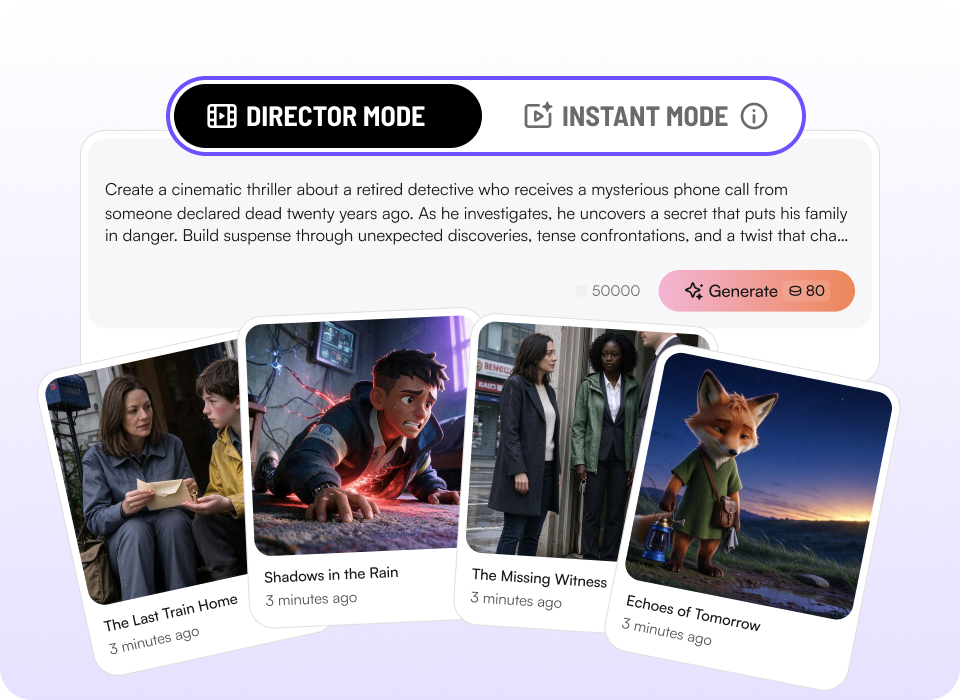
Instant Mode is designed for a fast prompt-to-video path and short-form iterations. Director Mode starts with a storyboard and provides more control over shots and multi-scene stories. For a closer look at the Instant Mode and Director Mode workflows, compare the desired pace of creation with how much shot-by-shot direction your project needs.

Instant Mode: up to 15 seconds Director Mode: multiple duration options Smart Reference inputs
Illustration of the Instant Mode and Director Mode selection and generated video scene cards
The two modes offer different levels of speed and scene direction.

Category Snapshot

A concise view of the plan data and product details available for this directory. The figures below describe listed plan information, not Cyber Monday discounts.

5

plan options covered in this directory

$15–$200

monthly billing prices listed for Standard through Max

80,000

monthly credits listed for the Ultra plan

17+

output languages listed in company information

The stated $15–$200 monthly range refers to Standard, Plus, Pro, and Max monthly billing. No Ultra price is specified in the information used here.

Plan directory

5 Mootion AI Video Creation Plan Options

Filter the plan cards by available product attributes. These are subscription options, not separate verified Cyber Monday deals; check the official plan page for current prices and terms.

Tags

Showing all 5 plan options.

Standard

Standard Plan

Type: Paid AI video-creation subscription

Pricing: $15 per month billed monthly, or $12 per month billed yearly ($144 billed yearly)

Description: Standard includes 1,500 credits per month, premium commercial models, up to 8 characters in the Character Library, all visual styles, multimodal input, AI script and image editing, realistic voiceovers, 10 GB of media, and watermark-free output.

Primary Use Case: Creating and downloading videos with a paid plan and the included creative features.

Website: View current plan details

Tags: monthly credits commercial models Character Library
Plus

Plus Plan

Type: Paid AI video-creation subscription

Pricing: $25 per month billed monthly, or $20 per month billed yearly ($240 billed yearly)

Description: Plus includes 3,000 credits per month and the Standard features. It adds support for up to 64 scenes per project, ultra-realistic voiceovers, expanded Character Library uploads, prioritized generation at 2×, and 20 GB of media storage.

Primary Use Case: Building projects that need more scenes, expanded character uploads, or additional storage than the Standard plan specifies.

Website: View current plan details

Tags: monthly credits scene capacity priority generation storage

Pro

Pro Plan

Type: Paid AI video-creation subscription

Pricing: $50 per month billed monthly, or $40 per month billed yearly ($480 billed yearly)

Description: Pro includes 8,000 credits per month and the Plus features. It adds large character allowances, prioritized generation at 5×, unlimited ultra-realistic voiceovers, and 100 GB of media storage.

Primary Use Case: Regular video production that calls for a larger monthly credit allocation, more storage, and faster generation priority.

Website: View current plan details

Tags: monthly credits priority generation storage voiceovers

Max

Max Plan

Type: Paid AI video-creation subscription

Pricing: $200 per month billed monthly, or $160 per month billed yearly ($1,920 billed yearly)

Description: Max includes 32,000 credits per month and the Pro features. It specifies up to 5,000 video clip generations, top-priority generation, 400 GB of media storage, and personalized customer support.

Primary Use Case: High-volume video creation where the listed credit allowance, generation priority, storage, and support are relevant.

Website: View current plan details

Tags: monthly credits priority generation storage personalized support

Ultra

Mootion Ultra

Described for professional creators and production teams. A plan price is not specified in the information available for this directory.

Check plan details

Type: Paid plan for professional creators and production teams

Credits: 80,000 monthly credits

Description: Ultra is listed with up to 100 scenes per project, early access to new features, top-priority generation, 400 GB of media storage, and personalized customer support. The available information does not state its monthly or yearly price.

Primary Use Case: Professional or team video production needing the listed monthly credits, project scene capacity, storage, and support.

Website: View plan management

Tags: monthly credits scene capacity priority generation storage personalized support

Compare generation credit rates

Video generation credit use depends on the model selected. The rates below are provided as credits per second; they are useful when estimating how plan credits may be used, but actual project needs depend on the clips you generate.

Video model Credits per second
Base4
MiniMax H3 Flash4
MiniMax H320
Seedance 2.0 Mini25
Seedance 2.040
Seedance 2.564

Video workflows and product examples

These official product videos illustrate features and example outputs described in the supplied information. They are product demonstrations, not additional Cyber Monday offers.

Instant Mode prompt-to-video

The demonstration covers short-form prompt-to-video creation, Smart Reference, supported video models, and one-click prompt optimization.

Director Mode references

This product video introduces custom character uploads, scene reference images, and reference videos in the storyboard-led workflow.

Native subtitles

The video demonstrates three dynamic subtitle styles available in Director Mode.

Reuse characters across stories

This video shows the Character Library workflow for saving characters and selecting them for a new story.

Mootion Ultra overview

See the supplied overview of the Ultra plan, described with 80,000 monthly credits for professional AI creators.

Character continuity

A reusable character library for story projects

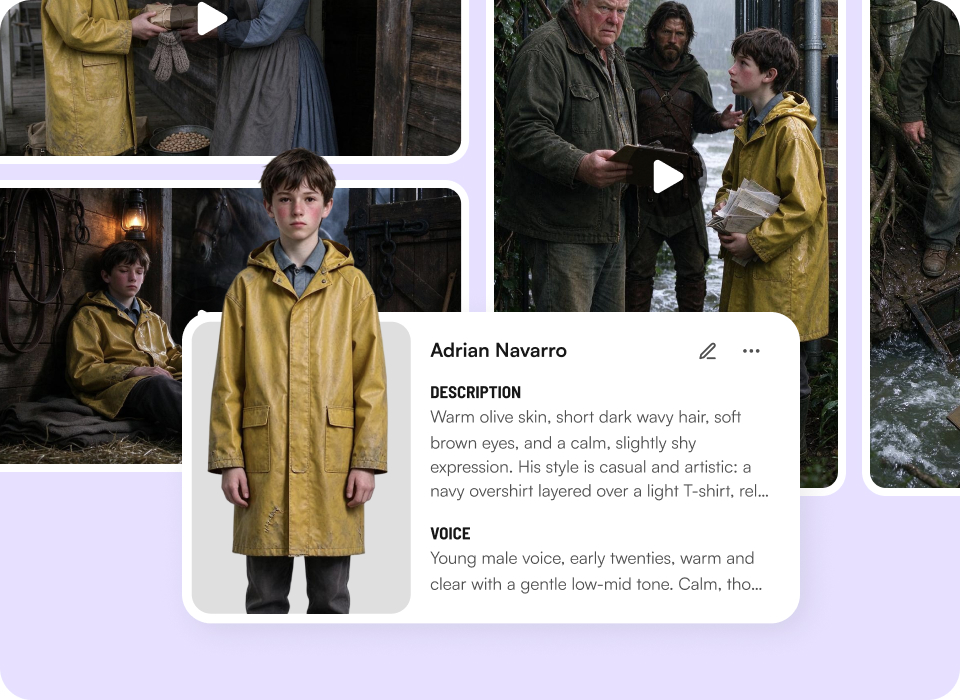
Director Mode includes a Character Library that lets users save characters from previous projects and reuse them in new stories. Character and scene references, as well as reference videos, can help guide generation. This feature may matter to creators planning recurring characters or connected scenes; review the plan page for current inclusion and limits.

When assessing AI video tools for consistent characters, check which mode supports character reuse and how the available plan describes uploads or allowances.

Character Library profile card surrounded by story stills, with description and voice sections
Character Library imagery supplied for the product feature.

How to Choose the Right AI Video Plan

Start with the actual shape of the work. A short prompt-led clip, a scene-by-scene story, and a high-volume production workflow can have different requirements.

If you want to create short-form clips quickly → prioritize the Instant Mode workflow and verify the supported duration and aspect ratio you need.

If your project needs multiple directed scenes → compare Director Mode, the scene limits listed for the plan, and the available duration options.

If your work depends on a specific visual reference → review Smart Reference and Director Mode reference support for images, videos, and audio.

If you expect repeated character-led stories → check the Character Library and plan-specific character allowances.

If model choice affects your credit budget → compare the supplied per-second model rates with your expected generation needs.

If you need more media storage or generation priority → compare the plan’s stated storage and priority-generation terms before subscribing.

If Cyber Monday savings are essential → verify a current promotion directly; no Cyber Monday offer is confirmed in the available information here.

Explore related video creation topics

These related resources connect plan research with common video production tasks. Follow the workflow that best matches the material you already have and the output you want to create.

AI storyboard planning Turn articles into videos Audio-to-video creation Educational video workflows Multilingual video creation Video generation API workflows

For example, an educator repurposing lesson material may value a different workflow than a creator developing a multi-scene narrative. To explore AI video creation for educators or multimodal video inputs, consider which source materials and production steps matter most before choosing a subscription.

Frequently Asked Questions

What does “Cyber Monday video editing deals” mean on this page?+

The phrase refers to time-limited offers for software used to create, edit, or prepare video during the Cyber Monday shopping period. This page organizes the Mootion plan and feature information available for 2026 so readers can compare options. It does not confirm that a Cyber Monday promotion is available.

No discount amount, sale price, promotion dates, or special offer terms were provided. Verify any current promotion on the official pricing page before buying.

How many plan options are listed, and what is the highest stated credit allowance?+

This directory lists five plan options: Standard, Plus, Pro, Max, and Ultra. The supplied information states that Ultra includes 80,000 monthly credits, while Max lists 32,000 monthly credits. No price for Ultra is specified here, so check the plan management page for current details.

The plan names and terms shown are a guide to the information supplied, not a guarantee that every displayed detail remains unchanged.

Is there a free Mootion plan or a confirmed Cyber Monday discount?+

No free plan is listed in the information provided, and a paid plan is required to create and download videos. No Cyber Monday discount, sale price, promotion dates, or offer terms are specified for this page. The listed subscription prices are plan pricing, not advertised seasonal sale prices.

Because promotions can change, review the official pricing page for the current checkout terms rather than assuming a discount applies.

What is the difference between Instant Mode and Director Mode?+

Instant Mode turns a single prompt into a finished video and is designed for quick iterations and short-form content; the described interface supports videos up to 15 seconds. Director Mode begins with a storyboard and gives users control over individual shots and multi-scene stories. The available Director Mode duration choices are 30 seconds, 60 seconds, 90 seconds, 3 minutes, 5 minutes, and 10 minutes.

Director Mode also supports the Character Library and reference assets described in the product information. Choose based on the amount of scene-level control your project needs.

How often is this directory updated, and how can I submit a deal?+

No directory update schedule or deal-submission process is specified in the information available for this page. For current prices, plan benefits, and any promotion, use the official plan page as the source to verify terms. This page should not be treated as confirmation of an active seasonal offer.

If you need to ask about business or API integration, the company information identifies business@mootion.com for demo inquiries. That contact is not presented here as a Cyber Monday deal-submission channel.

Compare the plan details before you subscribe

This 2026 directory brings together five Mootion plan options, stated pricing for four tiers, Ultra’s stated credit allowance, model credit rates, and product workflow information. It does not verify a Cyber Monday discount. Confirm current plan prices, availability, and promotion terms on the official pricing page before making a purchase.